Changelog

Follow new updates and improvements to Adminflow.

Attachments on task templates 📎
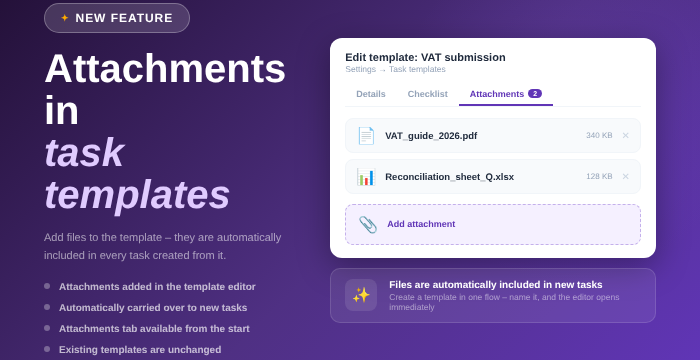
Happy Friday, everyone! 🎉 Your task templates can now have attachments, and the files follow along to every task created from the template. A nice one to get in place before the weekend. 😉

  • 📎 You add files to the template the same way you do on a regular task.
  • ✨ Creating a new task template with attachments is easier too: you give the template a name first, and it opens right away.
  • 📁 The attachments tab is available from the start, instead of appearing only after the template has been saved.
  • 💾 Uploading the files themselves still requires the template to be saved once. Adminflow lets you know if you try before that.

Existing templates are unchanged until you add attachments yourself. Have a great weekend! 🥳
Remove and delete documents directly in chat

Hi everyone!
Managing documents in chat just got a whole lot easier ✨💜

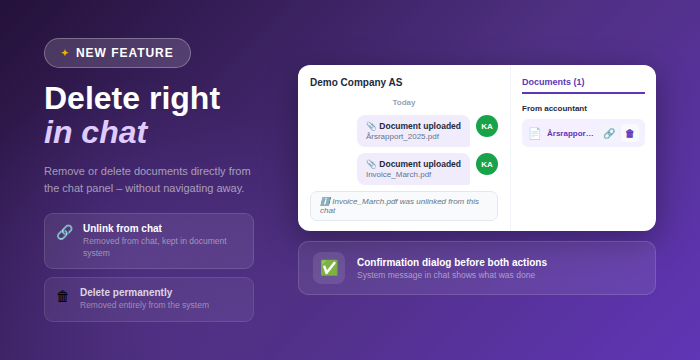
You can now handle documents directly from the chat panel, whether you want to simply remove them from the conversation or delete them entirely.

Added

  • Two new actions per document in the chat panel on hover:

    • Remove from conversation, which detaches the document from the chat but keeps it in the document system

    • Delete permanently, which removes the document from the system entirely

  • Confirmation dialog for both actions to prevent mistakes

Changed

  • Documents are removed instantly from the chat list after an action is performed

Improved

  • System message in the chat clearly showing what action was taken

  • A faster and more seamless way to manage documents without leaving the chat

This gives you better control and a smoother workflow when working with documents in chat 💡

Earlier updates